Chemistry
Molarity = number of moles per litre
Unit of molarity = moles per litre (mol/L)

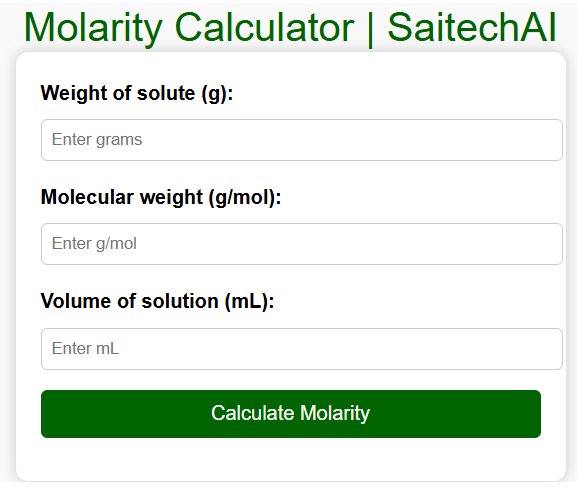
Molarity Calculator | SaitechAI
html + javascript for molarity calculator
Practice coding:
<!DOCTYPE html>
<html lang="en">
<head>
  <meta charset="UTF-8">
  <meta name="viewport" content="width=device-width, initial-scale=1.0">
  <title>Molarity Calculator | SaitechAI</title>
  <style>
    body {
      font-family: Arial, sans-serif;
      margin: 30px;
      background: #f9f9f9;
    }
    h2 {
      color: #006400;
      text-align: center;
    }
    .calculator {
      max-width: 400px;
      margin: auto;
      padding: 20px;
      background: white;
      border-radius: 10px;
      box-shadow: 0 0 10px rgba(0,0,0,0.2);
    }
    label {
      font-weight: bold;
    }
    input {
      width: 100%;
      padding: 8px;
      margin: 8px 0 16px 0;
      border: 1px solid #ccc;
      border-radius: 5px;
    }
    button {
      background-color: #006400;
      color: white;
      padding: 10px;
      border: none;
      border-radius: 5px;
      cursor: pointer;
      width: 100%;
      font-size: 16px;
    }
    button:hover {
      background-color: #004d00;
    }
    #result {
      margin-top: 15px;
      font-weight: bold;
      text-align: center;
      color: #333;
    }
  </style>
</head>
<body>

  <h2>Molarity Calculator | SaitechAI</h2>
  <div class="calculator">
    <label for="weight">Weight of solute (g):</label>
    <input type="number" id="weight" step="0.01" placeholder="Enter grams">

    <label for="mol_weight">Molecular weight (g/mol):</label>
    <input type="number" id="mol_weight" step="0.01" placeholder="Enter g/mol">

    <label for="volume">Volume of solution (mL):</label>
    <input type="number" id="volume" step="0.01" placeholder="Enter mL">

    <button onclick="calculateMolarity()">Calculate Molarity</button>

    <div id="result"></div>
  </div>

  <script>
    function calculateMolarity() {
      let weight = parseFloat(document.getElementById('weight').value);
      let molWeight = parseFloat(document.getElementById('mol_weight').value);
      let volume = parseFloat(document.getElementById('volume').value);

      if (isNaN(weight) || isNaN(molWeight) || isNaN(volume) || molWeight <= 0 || volume <= 0) {
        document.getElementById('result').innerHTML = "⚠️ Please enter valid numbers.";
        return;
      }

      let moles = weight / molWeight;
      let volumeLiters = volume / 1000;
      let molarity = moles / volumeLiters;

      document.getElementById('result').innerHTML =
        "Molarity of the solution = <b>" + molarity.toFixed(4) + " mol/L</b>";
    }
  </script>

</body>
</html>
Python code
def calculate_molarity(weight_solute, mol_weight, volume_ml):
    moles = weight_solute / mol_weight
    volume_liters = volume_ml / 1000
    molarity = moles / volume_liters
    return molarity

weight = float(input("Enter weight of solute (g): "))
mol_weight = float(input("Enter molecular weight of solute (g/mol): "))
volume = float(input("Enter volume of solution (mL): "))

M = calculate_molarity(weight, mol_weight, volume)
print(f"Molarity of the solution = {M:.4f} mol/L")
Molarity Calculator developed using Python
Powered by SaitechAI