Posted on Leave a comment

Python Short Programs Worksheets

SaitechAI • Python Programming Worksheet (Weighted Marks)
SaitechAI • Worksheet

Python Programming Worksheet — 10 Short Questions

Write your script in the box for each question. Tick “Correct” after verification. Use Show Key to reveal solutions. Weighted total: 20 marks.

Q1. Print the first 10 natural numbers using a loop.
Print numbers 1 to 10 on one line separated by spaces.
Key:
for i in range(1,11):
    print(i, end=" ")
Q2. Function to check if a number is even or odd.
Key:
def is_even(n: int) -> bool:
    return n % 2 == 0
Q3. Largest number in a list (no max()).
Key:
nums = [12, 4, 29, 7, -1]
m = nums[0]
for x in nums[1:]:
    if x > m:
        m = x
print(m)
Q4. Factorial using recursion with base cases 0 and 1.
Key:
def fact(n: int) -> int:
    return 1 if n <= 1 else n * fact(n-1)
Q5. Reverse a string input by the user.
Key:
s = input().strip()
print(s[::-1])
Q6. Multiplication table of a number up to 10.
Key:
n = int(input())
for i in range(1, 11):
    print(f"{n} x {i} = {n*i}")
Q7. Palindrome check ignoring case and spaces.
Key:
t = ''.join(ch.lower() for ch in input() if not ch.isspace())
print("Palindrome" if t == t[::-1] else "Not palindrome")
Q8. Count vowels (a, e, i, o, u) in a string.
Key:
s = input().lower()
print(sum(ch in "aeiou" for ch in s))
Q9. Swap two variables without using a third variable.
Key:
a, b = 5, 9
a, b = b, a
print(a, b)
Q10. Sum of all elements in a list read from a line of input.
Key:
nums = list(map(int, input().split()))
total = 0
for x in nums:
    total += x
print(total)
Total Score: 0 / 20
Posted on Leave a comment

Molarity Calculator

Chemistry

Molarity = number of moles per litre

Unit of molarity = moles per litre (mol/L)

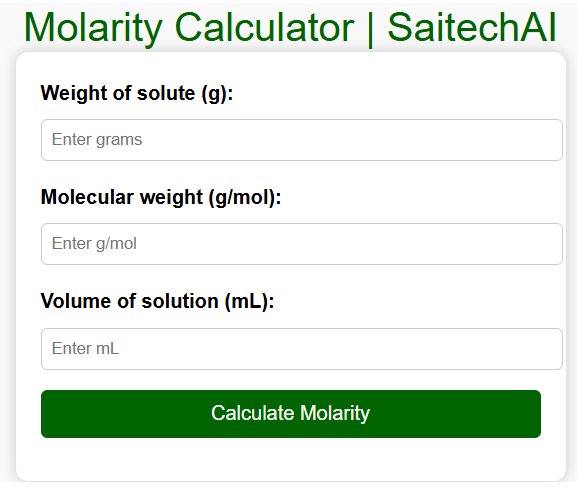
Molarity Calculator | SaitechAI

Molarity Calculator | SaitechAI

html + javascript for molarity calculator

Practice coding:

<!DOCTYPE html>
<html lang="en">
<head>
  <meta charset="UTF-8">
  <meta name="viewport" content="width=device-width, initial-scale=1.0">
  <title>Molarity Calculator | SaitechAI</title>
  <style>
    body {
      font-family: Arial, sans-serif;
      margin: 30px;
      background: #f9f9f9;
    }
    h2 {
      color: #006400;
      text-align: center;
    }
    .calculator {
      max-width: 400px;
      margin: auto;
      padding: 20px;
      background: white;
      border-radius: 10px;
      box-shadow: 0 0 10px rgba(0,0,0,0.2);
    }
    label {
      font-weight: bold;
    }
    input {
      width: 100%;
      padding: 8px;
      margin: 8px 0 16px 0;
      border: 1px solid #ccc;
      border-radius: 5px;
    }
    button {
      background-color: #006400;
      color: white;
      padding: 10px;
      border: none;
      border-radius: 5px;
      cursor: pointer;
      width: 100%;
      font-size: 16px;
    }
    button:hover {
      background-color: #004d00;
    }
    #result {
      margin-top: 15px;
      font-weight: bold;
      text-align: center;
      color: #333;
    }
  </style>
</head>
<body>

  <h2>Molarity Calculator | SaitechAI</h2>
  <div class="calculator">
    <label for="weight">Weight of solute (g):</label>
    <input type="number" id="weight" step="0.01" placeholder="Enter grams">

    <label for="mol_weight">Molecular weight (g/mol):</label>
    <input type="number" id="mol_weight" step="0.01" placeholder="Enter g/mol">

    <label for="volume">Volume of solution (mL):</label>
    <input type="number" id="volume" step="0.01" placeholder="Enter mL">

    <button onclick="calculateMolarity()">Calculate Molarity</button>

    <div id="result"></div>
  </div>

  <script>
    function calculateMolarity() {
      let weight = parseFloat(document.getElementById('weight').value);
      let molWeight = parseFloat(document.getElementById('mol_weight').value);
      let volume = parseFloat(document.getElementById('volume').value);

      if (isNaN(weight) || isNaN(molWeight) || isNaN(volume) || molWeight <= 0 || volume <= 0) {
        document.getElementById('result').innerHTML = "⚠️ Please enter valid numbers.";
        return;
      }

      let moles = weight / molWeight;
      let volumeLiters = volume / 1000;
      let molarity = moles / volumeLiters;

      document.getElementById('result').innerHTML = 
        "Molarity of the solution = <b>" + molarity.toFixed(4) + " mol/L</b>";
    }
  </script>

</body>
</html>

Python code

def calculate_molarity(weight_solute, mol_weight, volume_ml):
    moles = weight_solute / mol_weight
    volume_liters = volume_ml / 1000
    molarity = moles / volume_liters
    return molarity

weight = float(input("Enter weight of solute (g): "))
mol_weight = float(input("Enter molecular weight of solute (g/mol): "))
volume = float(input("Enter volume of solution (mL): "))

M = calculate_molarity(weight, mol_weight, volume)
print(f"Molarity of the solution = {M:.4f} mol/L")

Molarity Calculator developed using Python

Powered by SaitechAI

Posted on Leave a comment

Notes for Class12 Computer Science Students

Coding by Kasthuri Muthu

Class 12 Computer Science – Discussion Notes

Q1. File Handling
Content of file:
This is a test.
Isn't it? I think so.

Code:
file = open("samp.txt","r")
s = file.readline().split()
print(s[0][-1])

👉 file.readline() reads first line = "This is a test.\n"
 👉 .split() → ["This", "is", "a", "test."]
 👉 s[0] = "This"
 👉 s[0][-1] = "s"
✅ Answer: s

Q2. Dictionary with ASCII
d = {ch: ord(ch) for ch in "AEIOU"}
print(d)

✅ Answer: {'A':65, 'E':69, 'I':73, 'O':79, 'U':85}

Q3. Relative Path
File path:
D:\Program\Project\Railway\Reservation.py

If current directory = Project → relative path:
 ✅ Answer: Railway/Reservation.py

Q4. Expression
7/5 + 10**2 - (25+12*2)/4

Step:
7/5 = 1.4


10**2 = 100


12*2 = 24 → 25+24 = 49 → 49/4 = 12.25


1.4 + 100 - 12.25 = 89.15


✅ Answer: 89.15

Q5. Loop Output
str1 = "hello"
c = 0
for x in str1:
    if x != 'l':
        c += 1
    else:
        continue
print(c)

👉 "hello" has 5 characters.
 👉 2 are 'l', so counted = 3.
✅ Answer: 3

Q6. File Binary Mode
f = open("DATA.TXT", "rb")


Q7. Function Prod
def Prod(v):
    print(v*v)

print(Prod(2))

Step:
Inside function: 2*2=4 → prints 4


Function returns None → so print(Prod(2)) also prints None


✅ Answer:
4
None


Q8. Function CALLME
def CALLME(M,n1=1,n2=2):
    n1=n1*n2  
    M.append(n1)
    n2+=2 → n2 =4
    M.insert(n1,n2)
    print(M,n1,n2)

D=[10,20,30,45,60,75,90,120]
CALLME(D);
CALLME(D,3)

Step:
n1=3*2=6


Append 6 → [10,20,30,45,60,75,90,120,6]


n2=4


Insert 4 at index 1 → [10,4,20,30,45,60,75,90,120,6]


✅ Answer:
[10,20,4,30,45,60,75,90,120,2] 2 4
[10,4,20,30,45,60,75,90,120,6] 6 4


Q9. Identifiers
Valid: Emp_code, bonus, Emp1, Bond007
 Invalid: While (keyword), for (keyword), #count (illegal), 123Go (digit start)

Q10. Jumble Function
msg = "Butterfly"

Final output (after processing each char) =
 ✅ Answer:
Original: Butterfly
Final: CUuTfRgLz


Q11. Error
👉 No line in this program gives error.
 ✅ Answer: No error.

Q12–14. File Programs
👉 They ask to read, copy, and process text files (like NEWS.TXT).
Use with open("file.txt") as f:


Use readlines(), split(), isupper(), write().
 (We can write model answers if needed.)


Q15. Function with list
def ZeroEnding(SCORES):
    add = 0
    for x in SCORES:
        if str(x)[-1]=='0':
            add+=x
    print(add)

👉 For [200,456,300,100,234,678] → 200+300+100=600
✅ Answer: 600

Q16(i). Global/Local
value = 50
def display(N):
    global value
    value = 25
    if N%2==0:
        value = value + N
    else:
        value = value - N
    print(value, end="#")

display(20)
print(value)

Step:
global value=25


20%2==0 → True → value=25+20=45


Prints 45#


After function call → global value=45


✅ Answer: 45#45

Q16(ii). Random Output
👉 Since randint(0,1) + randint(1,2)+1, final selections depend on random.
 ✅ Possible outputs given:
[G,'Green'], [G,'Green'], [Y,'Yellow']


[G,'Green'], [B,'Blue'], [G,'Green']


[V,'Violet'], [B,'Blue'], [B,'Blue']


[I,'Indigo'], [B,'Blue'], [B,'Blue']


Q17. Binary File Functions
(i) Enter record:
import pickle
def writeItem():
    f=open("Itemdetails.dat","ab")
    Itemno=int(input("Enter Item No: "))
    ItemName=input("Enter Item Name: ")
    Quantity=int(input("Enter Quantity: "))
    Price=int(input("Enter Price per Item: "))
    rec=[Itemno,ItemName,Quantity,Price]
    pickle.dump(rec,f)
    f.close()

(ii) Display details for quantity=10:
def readItem():
    f=open("Itemdetails.dat","rb")
    try:
        while True:
            rec=pickle.load(f)
            if rec[2]==10:
                print("Item Name:",rec[1])
                print("Quantity:",rec[2])
                print("Total Price:",rec[2]*rec[3])
    except EOFError:
        f.close()


Q18. CSV File
CSV file data:
1,Peter,3500
2,Scott,4000
5,Sam,4200

Python function to read & display:
import csv
def readcsv():
    f=open("emp.csv","r")
    data=csv.reader(f)
    for row in data:
        print(row)
    f.close()

with open("file1.txt", "r") as file1:
    words_file1 = file1.read().split()

# Read file2.txt
with open("file2.txt", "r") as file2:
    words_file2 = file2.read().split()

# Find common words
common_words = []
for word in words_file1:
    if word in words_file2 and word not in common_words:
        common_words.append(word)

# Write common words to Combinedfile.txt
with open("Combinedfile.txt", "w") as combined_file:
    for word in common_words:
        combined_file.write(word + "\n")

print("Common words have been written to Combinedfile.txt")

Posted on Leave a comment

Unit Test in OOPS

Subject: Computer Science

Class: 12 CBSE

Marks (Q1 – Q6: 2 marks each; Q7-9 : 5 marks each)

  1. What is an object?
  2. What is a class?
  3. What is the difference between a class and a structure?
  4. What is the difference between a class and a structure?
  5. What are the main features of OOPs?
  6. What is the difference between a class and an object?
    Write a simple python program that creates a class with a single method.
  7. Write a simple class with init method
  8. Write a Python program to show that the variables with a value assigned in class declaration, are class variables and variables inside methods and constructors are instance variables.
  9. Python program to show that we can create instance variables inside methods.
Posted on Leave a comment

Python – test-1

  1. Python Program to Check if a Number is Positive, Negative or 0
  2. Python Program to Check if a Number is Odd or Even
  3. Python Program to Check Leap Year
  4. Python Program to Find the Largest Among Three Numbers
  5. Python Program to Check Prime Number
  6. Python Program to Print all Prime Numbers in an Interval
  7. Python Program to Find the Factorial of a Number
  8. Python Program to Display the multiplication Table
  9. Python Program to Print the Fibonacci sequence
  10. Python Program to Check Armstrong Number
  11. Python Program to Find Armstrong Number in an Interval
  12. Python Program to Find the Sum of Natural Numbers
  13. Python Program to Find HCF or GCD
  14. Python Program to Find LCM
  15. Python Program to Find Factors of Number
  16. Python Program to Find Numbers Divisible by Another Number